
ICS Calendar File Merger Software
ICS Merger Tool to Merge Multiple ICS Files
ICS Merger Tool combines many ICS calendar files into one file. Add files or a folder, preview the events, merge by date range and split the merged file by size. Calendars from Google, Outlook, Apple, Yahoo and Zoho all merge together.
- Bulk merge of many ICS files
- Date range and size split
- Detailed merge report
- Windows 11, 10 and a Mac edition

- Free DemoMerges 10 events
- 30 Day RefundDemo test comes first
- Card or PayPalHosted store checkout
- Fast License KeySent by email
- 24x7 SupportChat and email
1Is this my problem?
Which Calendar Problems Does ICS Merger Tool Solve?
Match your case in the list below. Merging joins many ICS files into one calendar file that apps accept.
- Calendar Apps Import One FileOutlook and Google Calendar take ICS files one at a time.
- Many Files From Many AppsGoogle, Apple and Outlook exports pile up as separate ICS files.
- Copy and Paste Loses DetailsReminders, locations and time zones drop out when you merge by hand.
- Merged File Is Too LargeAn ICS file above 10 MB can fail to import into Outlook Calendar.
- You Need Only One PeriodLast month or last year matters and the rest only adds noise.
- No Record of What MergedYou cannot tell which files and events went into the result.
Calendars From Many Apps
One person keeps work and home calendars in different apps.
Shared Team Schedules
A team sends ICS files that need to become one schedule.
Yearly Calendar Archives
Old exports need one tidy file for one period.
Keep the original ICS files in a safe folder and add copies to the software. Your only calendar export then never gets replaced by a merged file.
Close Outlook and other calendar apps first. Check the preview and the date range before you select Merge.
2What changes?
What Does a Merged ICS File Give You?
Before
- Dozens of ICS files sit in separate folders
- Details drop out when you merge by hand
- Large calendar files fail to import
After
- One ICS file holds the calendars you chose
- Dates, times and reminders stay as they were
- A merge report lists every file and event count
3What can it do?
What Can You Do With ICS Files Here?
Add, preview, filter and merge calendar files from one window.
Bulk ICS Merge
Add a batch of ICS files or an entire folder and merge them together.
Calendars From Many Apps
Combine ICS files from Google, Outlook, Apple iCloud, Yahoo, Thunderbird and Zoho.
Preview Before Merge
Check the added calendar data and remove files that do not belong.
Merge by Date Range
Join only the events between a start date and an end date.
Split After File Size
Cut the merged file into parts from 1024 KB up to 10 MB.
Data Hierarchy Preserved
Events, appointments, tasks and reminders keep their structure.
Dates and Times Preserved
Original date and time settings of every event stay unchanged.
Live Merge Status
Watch counts and progress on the built in dashboard during the merge.
Merge Report in CSV
MergeReport.csv lists source paths, destination, event count and status.
4Is it easy?
How to Test ICS Merging Free in 4 Steps
Merge your own calendar files in the free demo. Buy a license after the sample events look right.
- 1Download
Install the Demo
Install the 75.8 MB Windows demo on Windows 11 or 10 (64 bit) with Microsoft .NET 4.5 or above.
- 2Add
Add Your ICS Files
Select Merge ICS and then Add File(s) or Add Folder. Remove extra files and select Next.
- 3Set
Choose the Merge Options
Tick Merge ICS Within Date Range or Split Merged ICS After File Size if you need either one.
- 4Merge
Merge With a License
Select a destination folder and select Merge. Demo mode merges 10 events and a license key removes the limit.
Screenshots of every step sit in the ICS Merger Tool user guide.
5What will I see?
Which Screens Does the Merge Show?
Follow the path from added files to a finished merge.
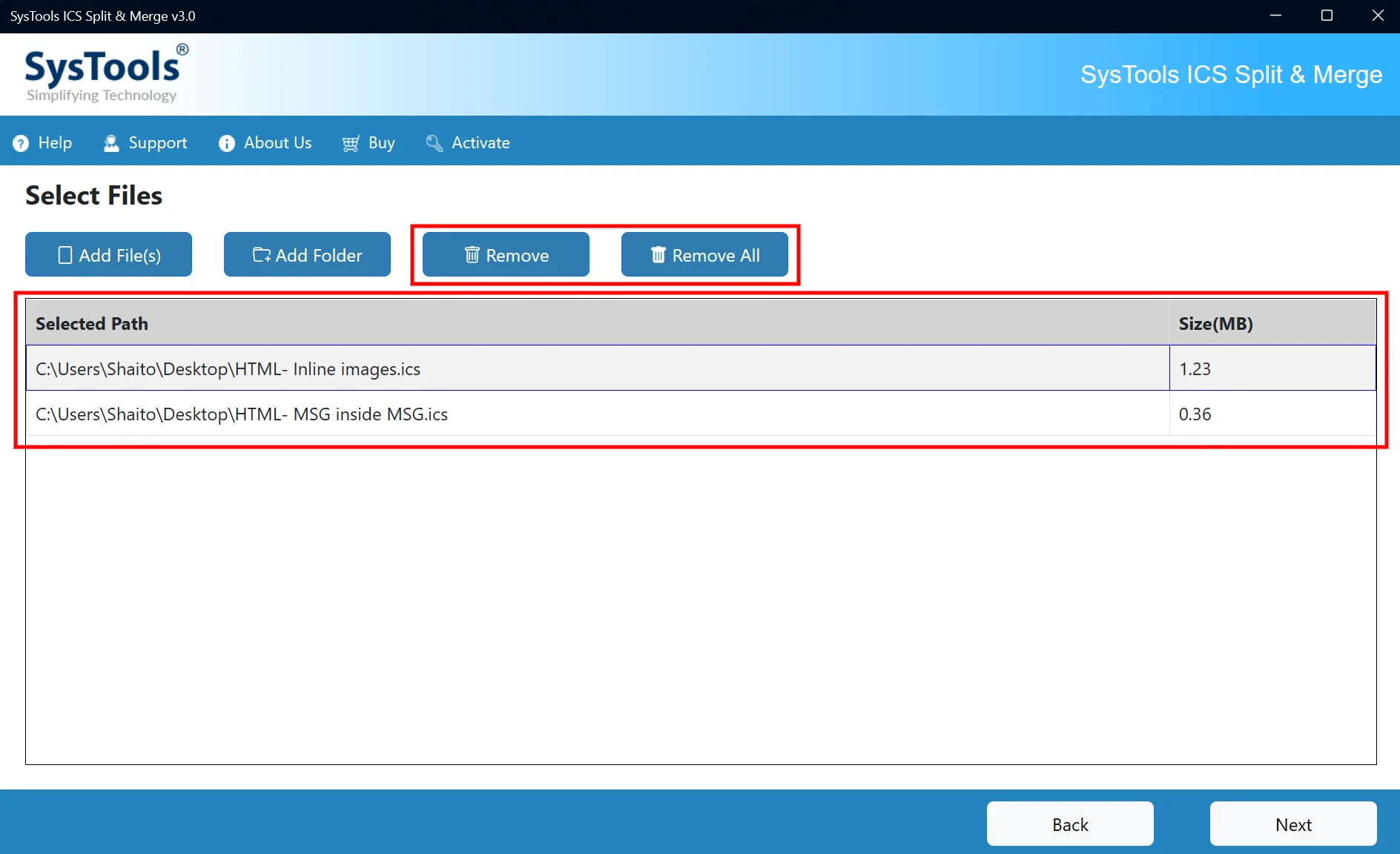
Add the ICS Files
Browse files or folders and review the list before you continue.

Set a Date Range
Choose the start and end dates and merge only that period.
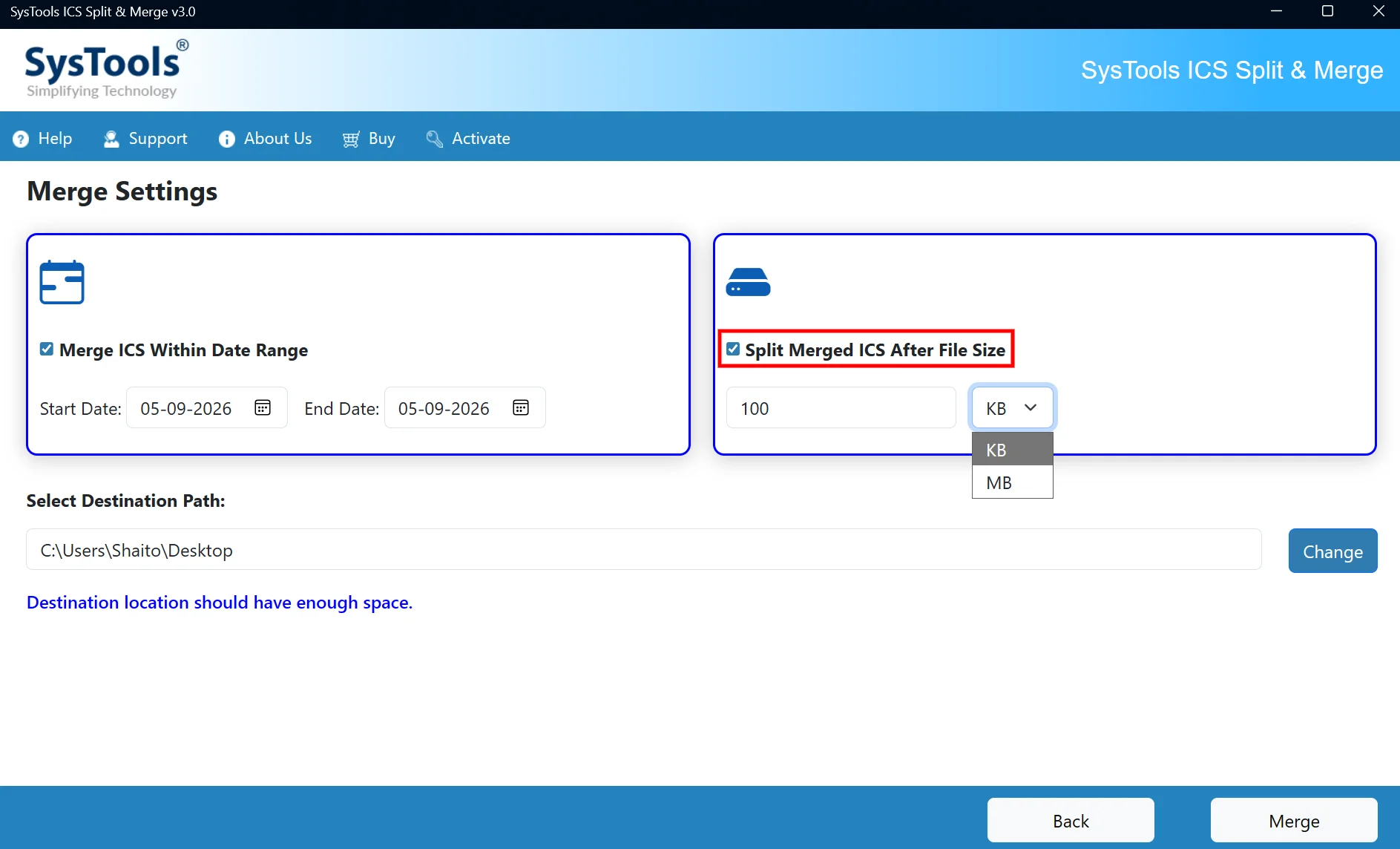
Split by File Size
Set a size in KB or MB to cut a large merged file into parts.
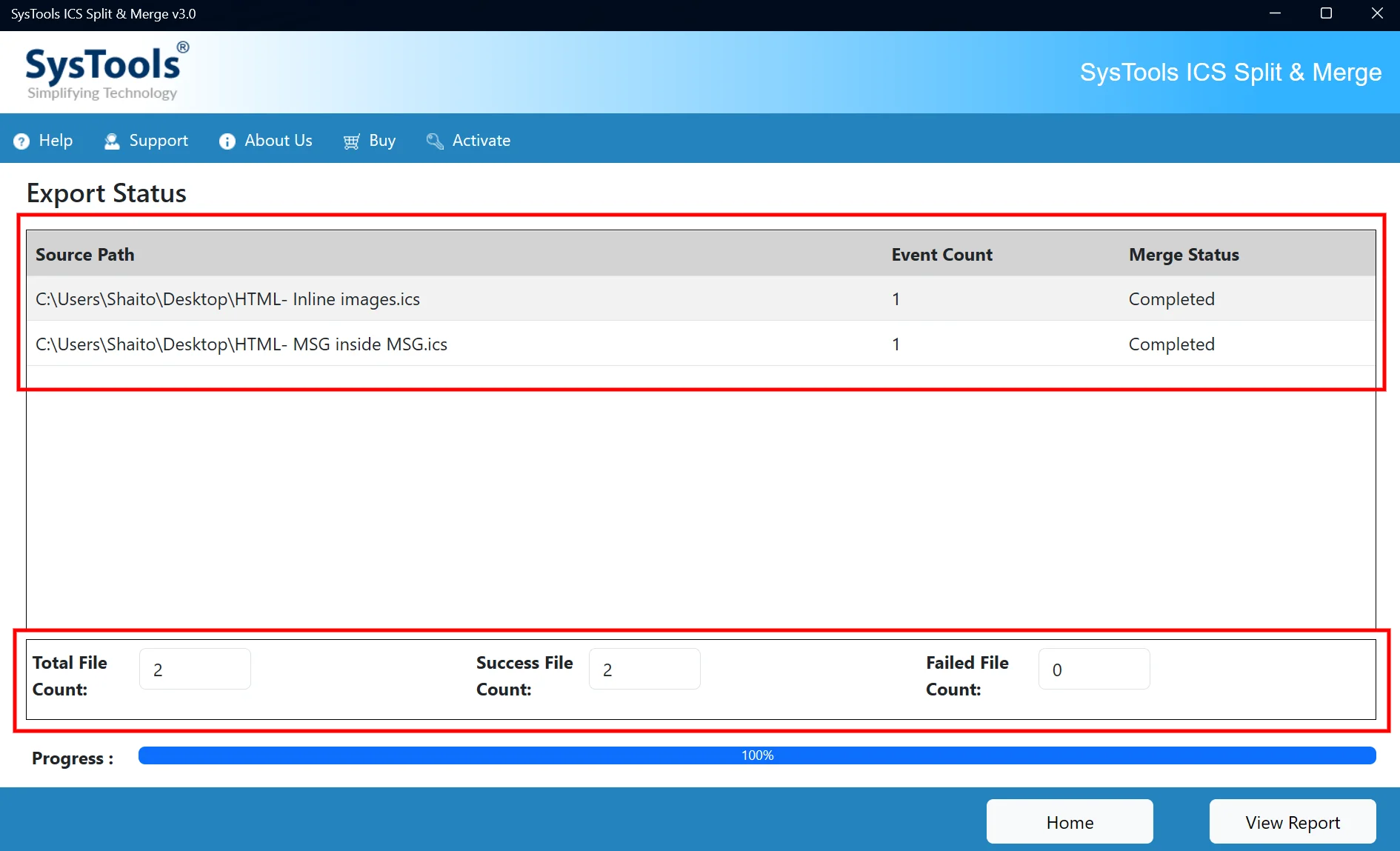
Watch the Merge Status
Counts and progress show live until the merge finishes.
6Demo or full?
ICS Merger Demo vs Full Version
Compare what the free demo does with what a license unlocks.
| Feature | Free Demo | Full Version |
|---|---|---|
| Add ICS files or a folder | Yes | Yes |
| Preview calendar data | Yes | Yes |
| Merge by date range | Yes | Yes |
| Split merged file by size | Yes | Yes |
| Events merged | First 10 | All events |
| Price | Free | From $29 |
7Will it fit my system?
System Requirements for ICS Merger
| Product Version | 3.0 for Windows and Mac |
|---|---|
| Download Size | 75.8 MB for Windows and 25.5 MB for Mac |
| Product Type | Desktop software to merge ICS calendar files |
| Input Files | ICS (iCal) files of any size from one or many apps |
| Output Files | One merged ICS file plus MergeReport.csv |
| Windows | Windows 11 and 10 (64 bit) |
| Mac | Intel and Apple Silicon M1 Macs with macOS 11 Big Sur up to macOS 15 Sequoia and above. Set the system region to United States and the language to English. |
| Processor | Intel Core 2 Duo E4600 at 2.40 GHz or higher on Windows |
| RAM and Disk Space | 4 GB RAM and 100 MB free disk space |
| Framework | Microsoft .NET 4.5 or above on Windows |
| File Size Limit | None stated |
| Split Sizes | 1024 KB up to 10 MB |
| Demo Limit | First 10 events on Windows and Mac |
8What is the price?
How Much Does ICS Merger Tool Cost?
Choose a software license by the number of computers and your type of use. Prices are in US dollars.
Personal License
$29
- Works on 1 computer
- Home and private use only
- 1 year of free updates
- Limited time 24x7 support
- Cannot move to another computer
Business License
$99
- Up to 100 computers
- Business, school, office or government use
- One location in one country
- Issued in your organization name
- Unlimited 24x7 support
- 1 year of free updates
Enterprise License
$199
- Up to 500 computers
- Offices in many countries
- Issued in your organization name
- Not transferable
- Unlimited 24x7 support
- 1 year of free updates
Mac licenses sell at the same prices. Buy the Mac edition license or download the Mac edition demo. Compare every bundle on the RecoveryTools offers page.
9Is it safe?
Can You Trust the Merger With Your Calendars?
See Results First
Merge 10 events in the free demo and open the ICS file before you pay.
In Business Since 2007
RecoveryTools stands on a company that began in 2007 and now helps users in over 100 countries. Find more about RecoveryTools.
ISO Certified
Standards ISO 9001:2015 for quality and ISO/IEC 27001:2013 for information security back the company. See the awards and certifications page.
Terms in Plain Sight
Refund, privacy and usage terms are public before you pay. See the refund policy, privacy policy and terms of use.
10Need a hand?
Where to Get Help With ICS Merging
Support engineers answer tool questions before and after you buy. Visit the RecoveryTools support center for phone numbers and more ways to get help.
Live Chat
Talk to an expert on live chat at any hour.
Email Support
Email support@systoolsgroup.com with your Windows or macOS version and the error message.
Remote Session
An expert connects to your computer and solves a hard case for you.
Secure File Sharing
Upload your ICS files to a secure FTP server. RecoveryTools can sign a Non Disclosure Agreement first.
11Still have a question?
ICS Merger Questions and Answers
Can ICS Merger Tool combine many ICS files into one?
Yes. Add several ICS files together and merge them in one pass. Single files work too.
Can I merge calendars from different apps?
Yes. ICS files from Google Calendar, Outlook, Apple iCloud, Yahoo, Thunderbird, Zoho, Android and Office 365 merge together.
Can I merge only a date range?
Yes. Select Merge ICS Within Date Range and set the start and end dates. Only events from that period go into the merged file.
Can I split a merged ICS file by size?
Yes. Enable Split Merged ICS After File Size and choose a size in KB or MB. Sizes range from 1024 KB up to 10 MB.
Is there a limit on ICS file size?
No limit is stated. Files from 10 KB to many MB merge in bulk.
Do dates and times stay the same after the merge?
Yes. Original dates and times of every event stay as they are. Events, appointments, tasks and reminders keep their hierarchy.
Can I preview events before I merge?
Yes. Preview the added calendar data first so only the right files go into the merge.
Does ICS Merger Tool create a report?
Yes. Merge Status screen shows counts live. MergeReport.csv lists source paths, the destination path, event counts and merge status.
Do I need other software to merge ICS files?
No. Install ICS Merger Tool and nothing else. Outlook or Google Calendar stays closed.
What does the free demo of ICS Merger Tool include?
Demo mode merges 10 events on Windows and on Mac. License keys remove the limit.
Is there a Mac edition?
Yes. Mac edition 3.0 works on Intel and Apple Silicon M1 Macs with macOS 11 Big Sur up to macOS 15 Sequoia and above. Get the Mac edition demo or the Mac edition license.
How fast do I get the license key?
Payment by card or PayPal at the hosted checkout triggers an email with your license key within 15 minutes.
Can I get a refund on ICS Merger Tool?
Yes. Refund requests are accepted for 30 days under the RecoveryTools refund policy. Software bought without a demo evaluation does not qualify. Email a signed Letter of Destruction to sales@recovery-tools.org.
12Where next?
Related Calendar Tools and ICS Guides
RecoveryTools Outlook PST Recovery
Repairs a corrupt PST file with its calendar folders.
RecoveryTools OLM to PST Converter
Exports Mac Outlook calendars from OLM files to PST.
RecoveryTools Office 365 Backup Tool
Saves Office 365 calendars and mail as PST backups.
RecoveryTools OLK Converter
Exports Mac Outlook 2011 OLK14 items to PST, EML and MSG.
RecoveryTools MSG Migrator
Moves Outlook MSG files to PST and other formats.
RecoveryTools MS Excel to vCard Converter
Exports Excel contact sheets to VCF files.
Calendar Guides From RecoveryTools
Test ICS Merging on Your Own Calendar Files
Download the free demo, merge 10 events and buy the software license when the result looks right.