How to Convert Excel Contacts to Android Phone? Quick Guide

Looking for a reliable solution to convert Excel contacts to Android phone? However, you didn’t find a solution? do not worry now. You have come to the right place, In this post you will get a perfect and effective solution to export Excel XLS contacts to Android mobile phones easily.
Smartphones are the most used devices by users and play a very important role in user communication. Without contact information, it is impossible to maintain communication and these contacts must be managed. Many professionals store their contact information in Excel sheets. To do this, the user needs to import contacts from Excel to the Android and there is no way to copy these contacts directly. This is because Android devices support storing contacts in vCard or VCF format.
Methods to Convert Excel Contacts to Android Phone
Best Solution to Export Contacts to Android Smartphone
To Export contacts from Excel file to Android mobile device, you can use Excel to VCF Converter. This software is a complete solution to convert Excel contacts (XLS, XLSX, CSV) to VCF or vCard file format. This utility has a simple design and many advantages. This application is designed with an interactive user interface that does not require technical skills. Nowadays, VCF files are used as the standard file format for storing contacts data across platforms such as Gmail, iPhone, Yahoo, smartphone, Skype, and WhatsApp applications. This tool provides generated vCard files that are compatible with any platform.
Compatibility With Excel Files for Android
- Tool convert Excel contact list to Android OS
- Bulk import Excel contacts to Google Pixel Phone
- Quickly transfer Excel contacts file to Samsung Galaxy
- Software export contacts from Excel to Motorola
- Allows users to transfer MS Excel contacts to HTC
- Provides support for transfer contacts from Excel to Xiaomi
- Instantly move contacts from Excel to Micromax
- Transfer bulk contacts from Excel to LG
- Software transfer contacts from Excel to OnePlus
- Transfer batch contacts from Excel to Sony Xperia
- Tool export contacts from Excel to OPPO
- Allows users to move Excel contact list to Vivo
- Quickly transfer contacts to Asus ZenFone
- Software transfer contacts from Excel to Lenovo
- Instantly migrate contacts from Excel to Acer
- Import multiple contacts from Excel to Gionee
- Instantly transfer contacts from Excel to Huawei
- Migrate one or more contacts from XLS, CSV to Lava
Instant Steps to Convert Excel Contacts to Android Phone
Here is the step-by-step process to export Excel File to Android Supported vCard file format:
Step 1: Download and Open the Software, Click on Browse Button.

Step 2: In the Next Window, Select the Required Excel File and Click on the Open Button.

Step 3: Next, Preview All Contacts of Selected Excel XLSX / XLS / CSV File.

Step 4: In Next Tab, Map Excel Fields to vCard Fields. Then, Click on the Next.

Step 5: Next, Select vCard Version: 2.1, 3.0 & 4.0. Click on the Convert Button to Start Process.

After converting Microsoft Excel contacts to vCard file, the process of transferring Excel contacts (as VCF file) to Android smartphone becomes easier.
Import the Resulting VCF File to Android Smartphone
Once you have your Excel contacts in a VCF file, you can easily transfer them to Android smartphones.
1.Connect your Android device with computer using USB cable.
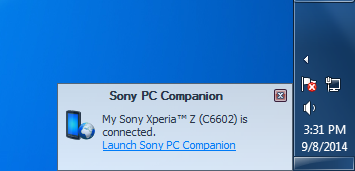
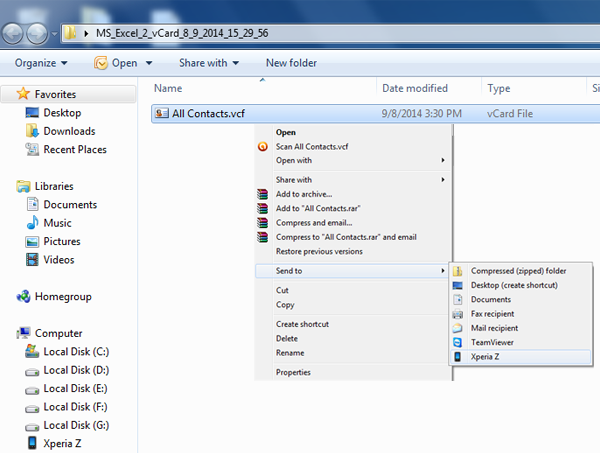
2. Now Send “Allcontacts.vcf” file to your Android device.
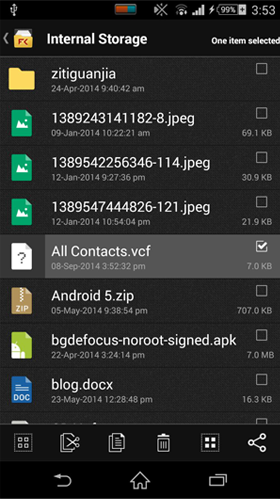
3.Open Internal Storage Folder to check if “Allcontacts.vcf” file is copied properly.
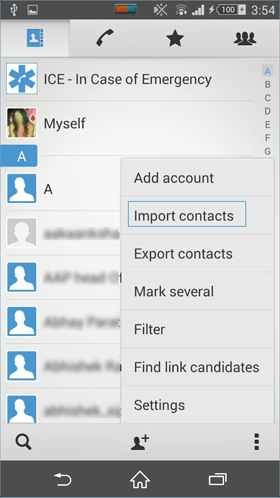
4. Now open contacts, Right click on More options and select “Import Contacts”.
5. Now options will be available like Sim Card, Internal Storage, SD Card. Select “Internal Storage” from It
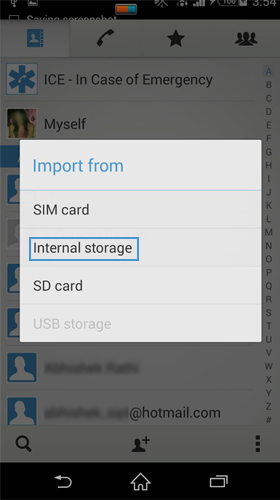
6. Select under which account you want to import vCard file, either your configured emails accounts or local contacts, Select “Local Contacts”.
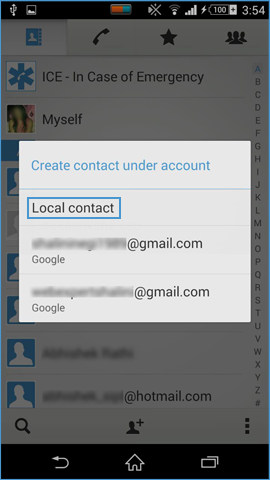
7. Now device will start searching for available vCard file formats in Internal Storage.
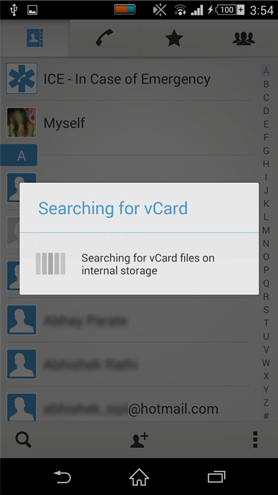
8. Once the search is complete, pop-up window will appear with available VCF files, select the one you want to import in your contact list.
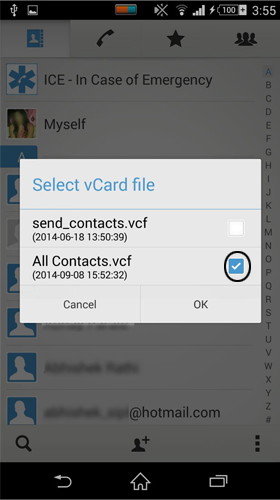
Note: After selecting the desired VCF file, the device will add the contact to the phone’s contact list. Thus, the process of importing contacts from Excel sheet to Android using the Excel to Android Contacts Converter Tool is completed successfully.
Conclusion
There is no manual solution to convert Excel contacts to Android devices. Only professional software offers the option to export Excel XLS, XLSX, CSV to Android VCF file format. Also, we have mentioned all the manual steps to convert Excel contacts to Android Phone.