Import MBOX to Thunderbird while retaining all email attributes, folder hierarchy, embedded images, and file attachments. Use Thunderbird Import Tool which supports MBOX, EML, EMLX, and Maildir file formats and makes migration of archived emails very convenient.
Import EML, EMLX, Maildir, MBOX Files in Thunderbird
Support All Size of MBOX File As There is No File Size Limitation
Uphold Folder Hierarchy & Meta Properties During Upload
Import Multiple Emails in Bulk Along with Attachments
Date Filter Option to Import emails of Certain Time Period
Open Emails with Original Read/Unread Status in Thunderbird Client
Supports MBOX File of All Origins:Thunderbird, Mac Mail, Gmail, Etc
Add MBOX Files to Configured Thunderbird Accounts & Local Folder
Retains All Metadata of Imported Files in Thunderbird Application
Thunderbird Import Tool is Available for Both Mac & Windows OS
Tool is Compatible with Latest Desktop Thunderbird 153.0.2 Version
Import MBOX to Thunderbird Along with Other Files
Import Maildir Files to Thunderbird
Thunderbird Import Tool supports all file formats of Thunderbird email client. It provides the option to select and add multiple maildir files to Thunderbird account. The software provides the option to select the Thunderbird identity to directly import these files to Thunderbird in bulk.
Add EML Files to Thunderbird
Thunderbird Importer also supports EML file format. These single message files are easily imported in Thunderbird profile one at a time or all at once. The tool renders the option to apply date-range filters to import selective files that contain message falling between the set "From" & "To" date.
Save EMLX Files to Thunderbird
Thunderbird Import tool is not limited to importing MBOX to Thunderbird local folders. It has multiple options on its starting screen to select the data file of your choice like EMLX file. Using this option, one can add these files in bulk and import them all into Thunderbird in a single go.
Highlighted Features of Thunderbird Import Tool
Add Multiple MBOX Files to Thunderbird in Bulk
Dual Options to Import MBOX File
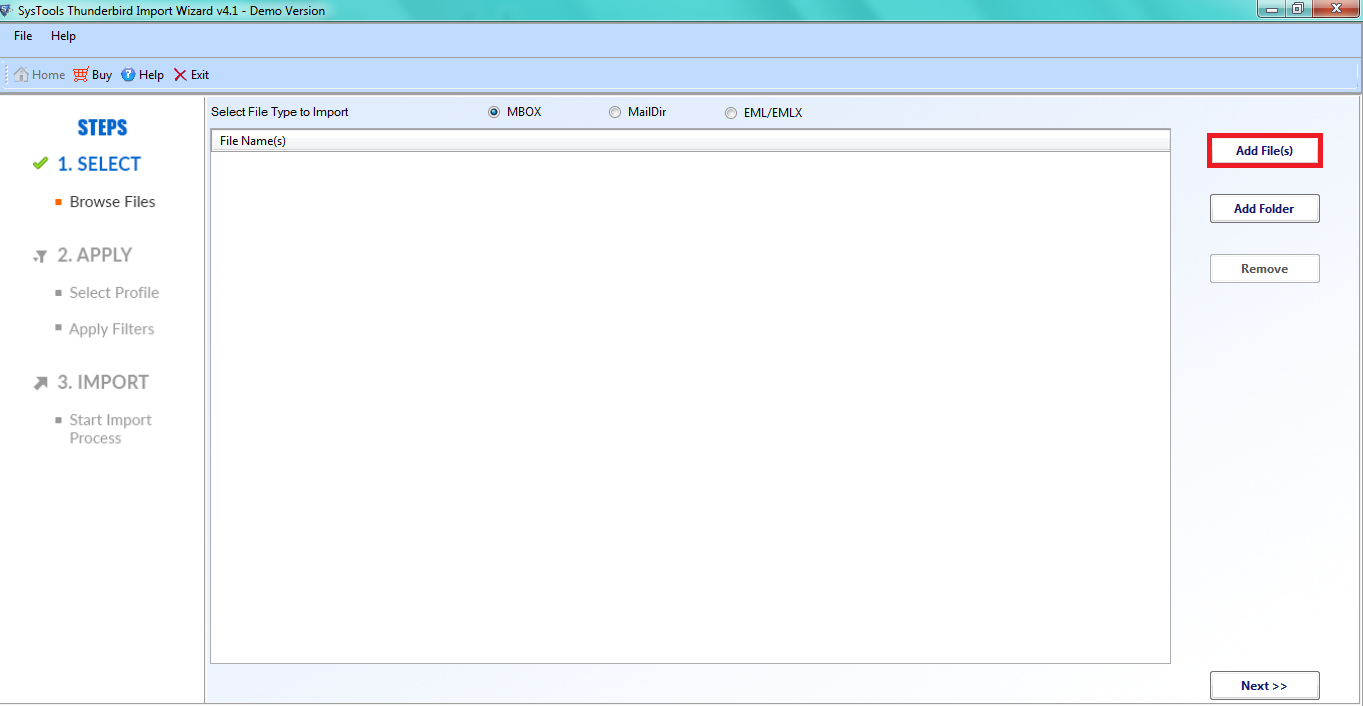
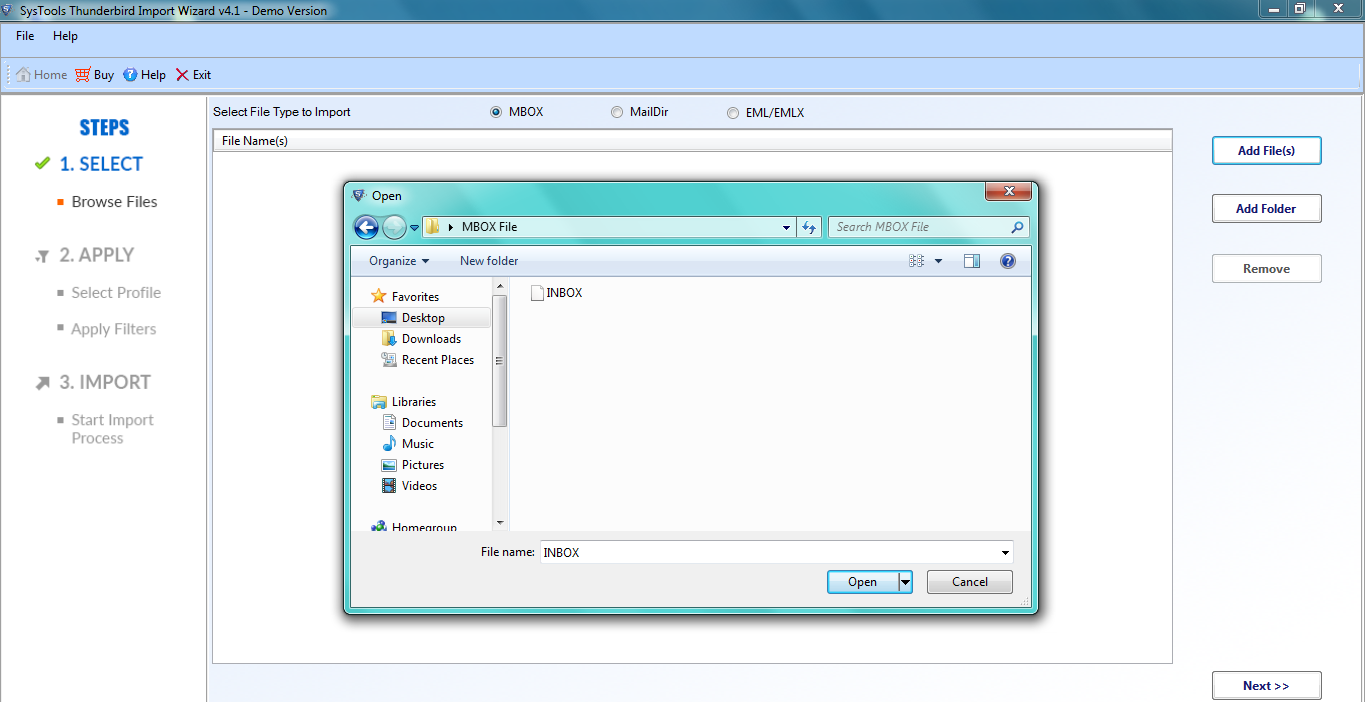
The tool allows users to import several MBOX files into Thunderbird. It provides two options to open a file i.e. File Mode and Folder Mode. The application supports MBOX files created in both Windows and Mac OS email clients for smooth importation.
Add File: This option enables users to select MBOX files individually.
Add Folder: This option enables users to select a folder containing one or more MBOX files.
Supports Multiple File Formats
Various email clients generate files other than MBOX for email file storage. Thunderbird Import Wizard provides the option to import the following files in Thunderbird in bulk with attachments.
Maildir Files
EML Files
EMLX Files
MBOX/MBX/MBS Files
Date Filter for Selective Import
Thunderbird Import Tool has an advanced date filter option which allows users to filter emails date wise. Instead of uploading entire MBOX file, users can apply filter using 'From Date' to 'To Date'. This feature is helpful when users want to import required emails of MBOX file to Thunderbird account.
Keep Folder Structure Intact
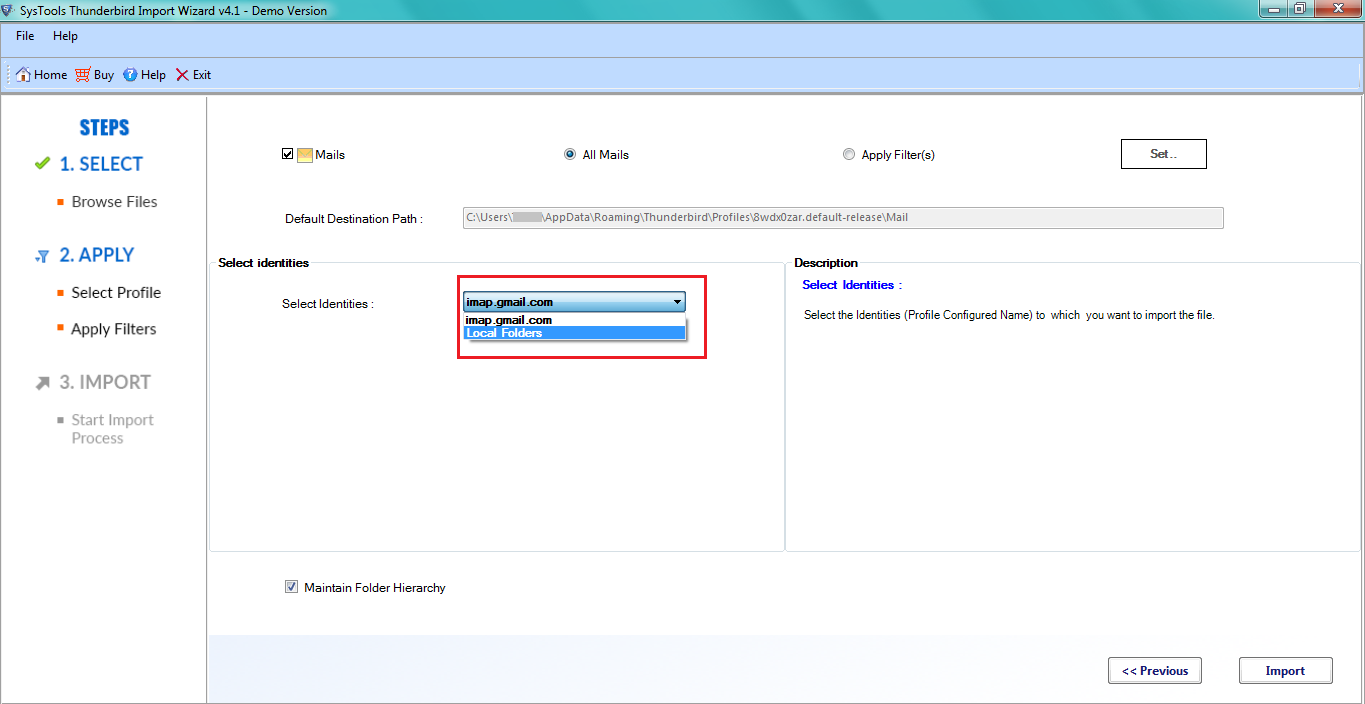
While importing MBOX to Thunderbird account, there is an option available named Maintain Folder Hierarchy which sustain folder structure by keeping emails inside their original folder. The tool also preserves data integrity by keeping meta properties such as Subject, Date, etc. intact.
Load & Import File of Any Size
Thunderbird Import Tool doesn't have any restriction on the size of MBOX files. It can add all sizes of MBX, MBS, MBOX files in Thunderbird. The tool will not restict user to limit MBOX file size.
Import Emails into Desired Profile
This feature is best suited when Thunderbird is configured with multiple accounts. In such case, the tool provides an option to select desirable profile in which they want to import their emails from MBOX to Thunderbird directly.
Generate Import Status Report
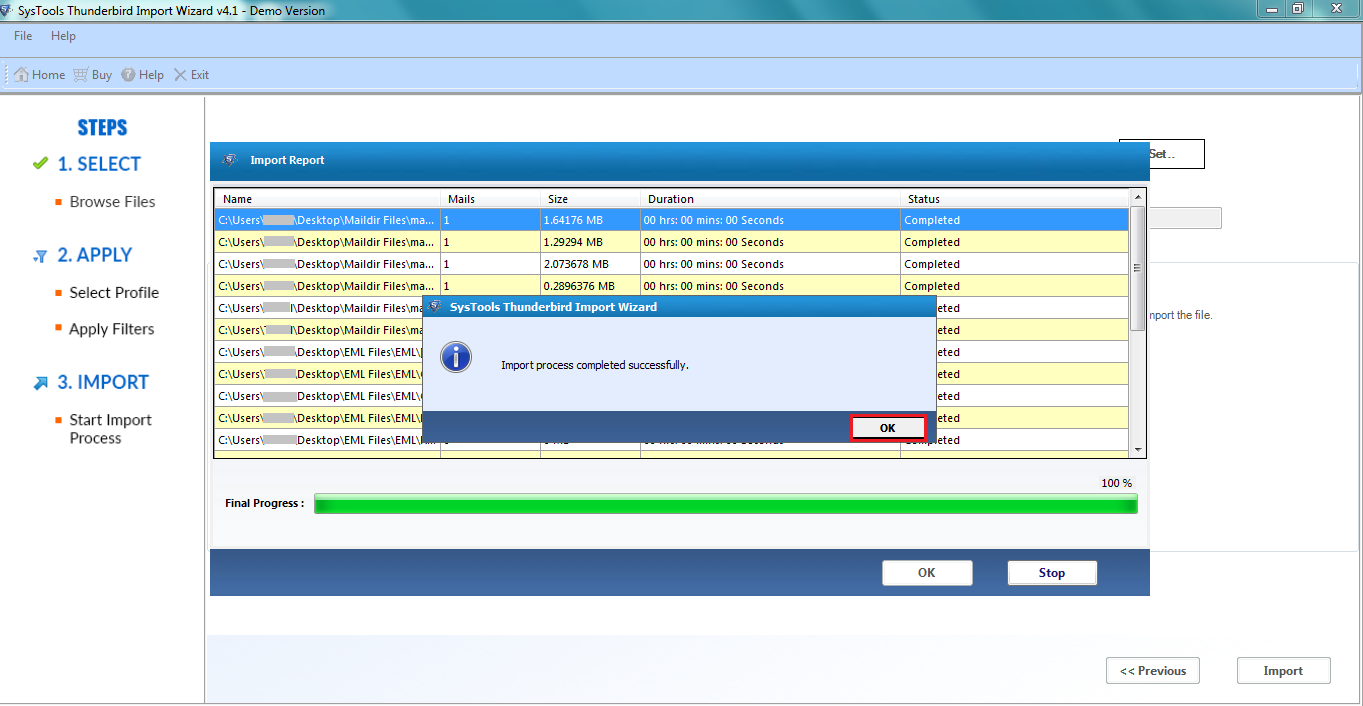
After completing import process, the tool generates export report containing name of the MBOX file, size, number of emails, time taken in import process of each MBOX file. The import process can be saved in CSV format on the local drive.
Intuitive Graphical Interface
Thunderbird import MBOX tool is best known for its intuitive interface. It makes the task so much easier that even non technical perform can easily import various MBOX files. Each and every step is described in a simpler manner.
Compatible with All Windows Versions
The Thunderbird Import Tool can run on all the latest versions of Windows operating system that includes Windows 11 (64-bit), 10 / 8.1 / 8 / 7 (32-bit & 64-bit). It also supports the latest Thunderbird desktop verison 153.0.2 which users can download and open MBOX file in Thunderbird directly.
Import MBOX to Thunderbird Mac
Users can also import MBOX files to Thunderbird on Mac OS X 10.8 & all above versions. There is a separate tool for Mac that has an additional option to import address book (Sqlite, vcf and ldif).
Thunderbird Import Wizard - Working Video
Watch Video Tutorial to Understand How Software Works
Trustworthy Solution100%
Data Integrity Maintained98%
After Sales Support100%
Thunderbird Import Tool Specifications
Download Tool to Import MBOX to Thunderbird on Mac & Windows OS
Limitations Windows version of the tool allows to import first 25 emails per MBOX files in Thunderbird account; Mac Version of Thunderbird Import Tool allows to import first 10 emails from each MBOX file to Thunderbird profile.
System Specifications
(Windows)
Hard Disk Space
Minimum 100 MB of free hard disk space
RAM
4 GB is recommended
Processor
Intel® Core™ 2 Duo CPU E4600 @ 2.40GHz 2.39GHz
(Mac)
Hard Disk Space
100 MB of free hard disk space required
RAM
4 GB is recommended
Processor
Mac Computer with Intel Processor
Mac Computer with Apple Silicon (Apple M1)
Pre-Requisites
Windows
Microsoft .NET Framework v4.5
Thunderbird should be installed and configured on the Windows system.
Mac
Java JDK 1.8.0 & JRE 8 should be installed in the system.
Thunderbird must be installed and configured on the Mac system.
Thunderbird Importer Full Version vs Trial Version
Comparing the Features of Software to Import MBOX to Thunderbird in Trial and Full Version
Features
Free Version
Full Version
Add MBOX / MBX / MBS Files
Add EML / EMLX / Maildir Files
Import Emails & Attachments
Supports Windows OS 11 , 10, 8, 7 & Windows Server 2019, 2016, 2012 R2, 2008
Date Range Filters
Import MBOX to Thunderbird
25 Items / Folder
Frequently Asked Questions
No manual or our Thunderbird import tool can directly transfer data into an IMAP configured account in Thunderbird. But, you can import MBOX emails to Thunderbird Local folders and then drag and drop all the imported emails into the required IMAP configured account.
Yes, Thunderbird must be installed and configured properly for valid profile.
Yes, Thunderbird Import Tool provides an option to add multiple files and import all files at once.
Yes, it imports any size of MBOX files within few clicks.
Yes, Thunderbird Import tool is compatible to run on 32-bit Windows 11 OS.
Yes, the Thunderbird Import Tool is capable of importing EML, EMLX, Maildir, MBOX, MBX, and MBS files. You can select the required files and open it into your Thunderbird account in one go.
Yes, with the help of our Thunderbird importer, you can make use of the date filter option. You have the option to set the From Date and To Date. Only those emails will be imported which fall in the selected range.
Yes, the Thunderbird Import Tool will keep your folder structure, email properties, metadata, and attachments while importing data. It will help you to retain the structure of your mailbox.
Thunderbird Import Tool - Client Reviews
What Our Trusted Users Saying?
Lizeth, France
I have used other products of RecoveryTools before. The easiness of importing emails from MBOX to Thunderbird can only be accomplished by your tool. Thanks Team!
Numan, USA
The Thunderbird import tool helped me in Importing multiple MBOX files into my Thunderbird profile without any hassle. It is a fast and amazing tool.
Rachel, Canada
It was unnecessary for me to upload the entire MBOX folder in Thunderbird, since all I needed were emails from a certain time period. Your Thunderbird Import Tool helped that I could use a date filter to choose the right From and To dates. Just what I wanted!
Thomas, Germany
I had a huge MBOX archive which I found hard to handle manually in Thunderbird. Using the RecoveryTools Thunderbird Import Tool, I was able to import the email into the mail box without having to break up the archive into small files. It really made my work easier.
Lisa, Netherlands
I had more than one account in Thunderbird that I needed to transfer, so I had to import the MBOX into the right account. The ability to choose the appropriate Thunderbird profile made everything easy. The emails got imported properly.