A Complete Guide to Perform SQL Server Object Level Recovery

SQL Server environment is usually prone to various errors and requires consistent monitoring to keep the data secure and safe. In many cases, database administrators are required to perform SQL Server object level recovery to fix the issues and damages occurring in the database objects. This article explains the best methods for object level recovery in the database.
What is an Object in SQL Server Database?
SQL Server is a standard relational database language used to manage and manipulate data. It is developed and distributed by Microsoft. SQL stands for Structured Query Language. An object is a data set that is used to store or reference data in a database. The purpose of creating commands in the database is to create objects for storing or manipulating data. Examples of data objects are views, indexes, sequences, tables, forms, and reports.
Consider an Example: In a program called Phonebook, when you create a contact group that includes first name, last name, and phone number. The entries are the records, and the contact group is the object. Let’s now take a look at what a corrupt database is before proceeding with SQL Server object level recovery.
What is a Corrupt Database? Explained
One of the most terrible things DBAs come across is database corruption. Obviously, one of the most effective ways to deal with database corruption is to avoid doing anything that can worsen the situation entirely. Database corruption is defined as a problem related to the incorrect storage of the actual zeros and ones required to store database data at the disk or I / O subsystem level. With a corrupt database, the data residing in it comes at a greater risk of permanent loss and increased risk of several errors and issues. Hence, it becomes crucial for the database administrators to understand the cause of corruption and then find effective ways, such as SQL Server object level recovery or complete database repair.
What are the Reasons Behind a Corrupt Database?
A damaged database can be for many reasons. The main question is, when is the database corrupted? The answer to the question is divided into two parts. First, when writing the file to the database, and second, when saving the file. Example:
Page-level Corruption: All data in the database is stored in the form of pages. The page collection is saved as a file in the main file, also called an MDF file. When information is changed in any part of the paging file. It is of no use to the user as the user cannot open the file. This can cause many types of hardware failures in the system: main memory crash, hard drive crash, power failure, etc.
Operating System Failure: There are many situations that can cause the operating system to crash. This can be caused by Ransomware Attack on SQL Server, Viruses, or Malware. This can corrupt the database and this type of corruption does not occur more than once. Sometimes data is so corrupted that it is difficult to restore.
Power Failure: If the backup is not taken, the abrupt system shutdown could damage the database. An unexpected system shutdown without backup power not only leads to database damage also data loss can occur.
These are some more examples of getting your database corrupted.
How to Perform SQL Server Object Level Recovery?
There are two ways to perform the object level recovery in SQL Server. Manual and professional solutions are methods of performing an object restoration. The first method requires a SQL backup file.
SQL Server allows restoring the database from the backup file. From the database or the local computer. Select the SQL Server database backup file from the stored location.
Steps to Perform SQL Server Object Level Recovery from a Backup File:
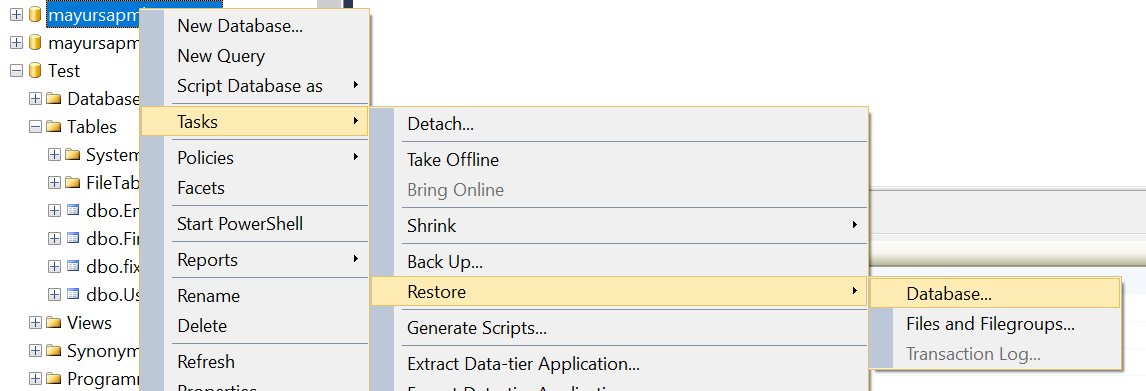
1: Right Click on a Database >> Task >> Restore >> Database
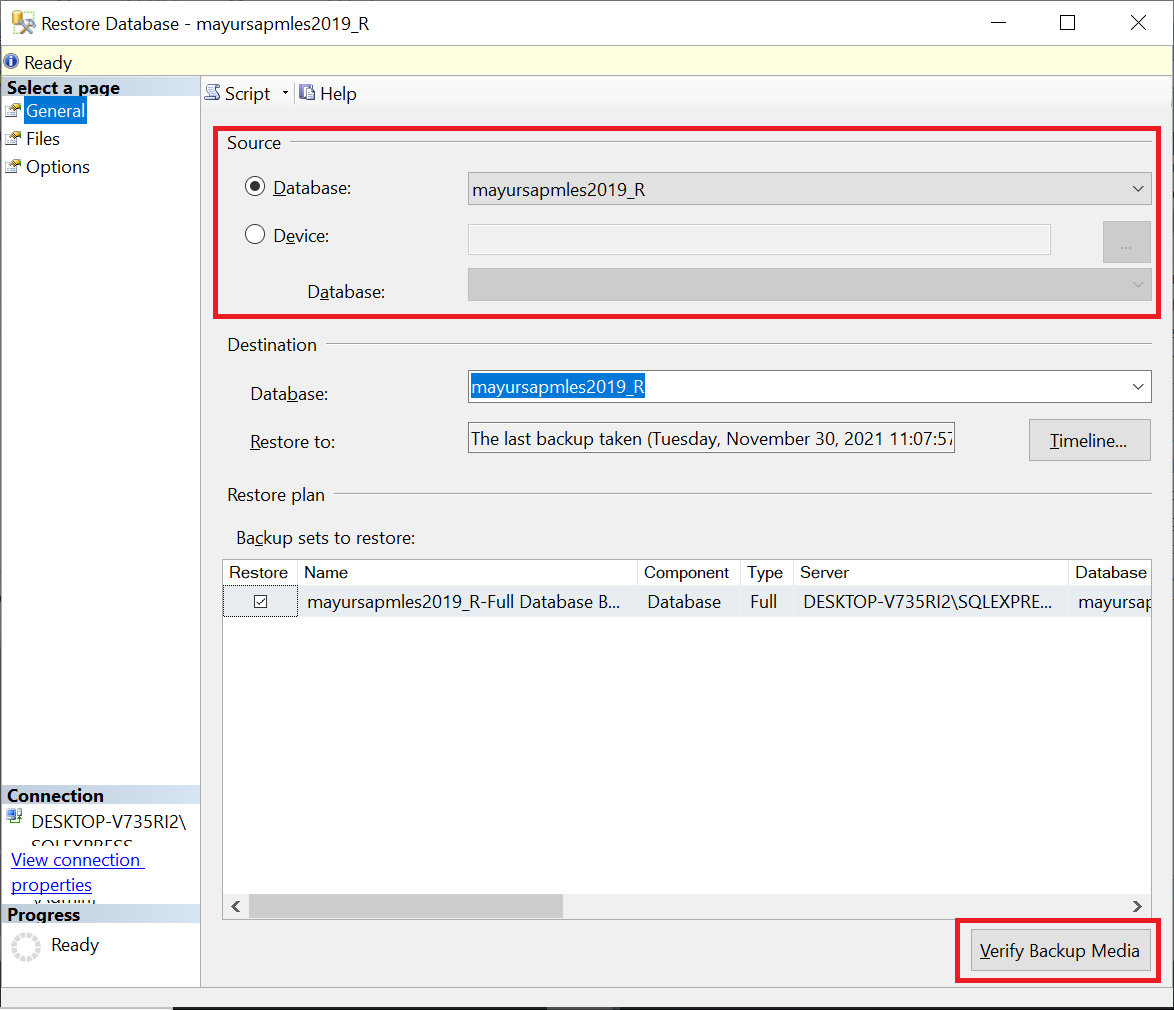
2: Select Source Destination: Database or Device
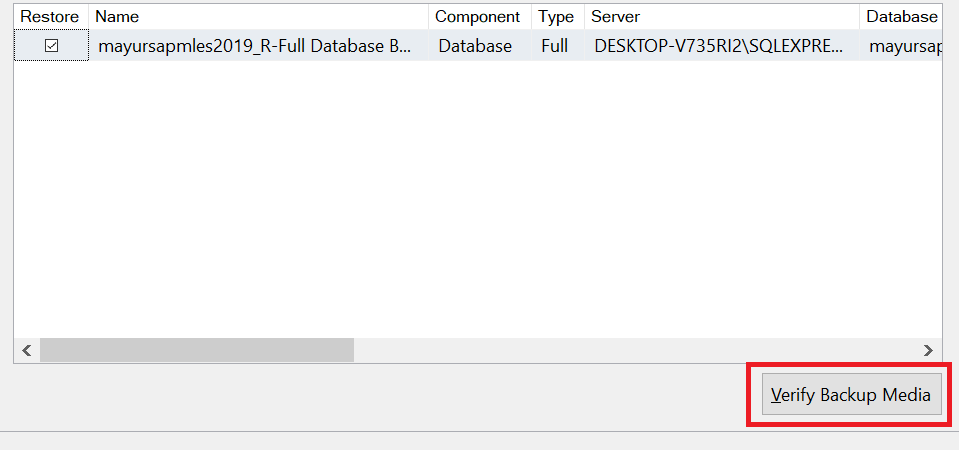
3: Next Click on Verify Backup Media >> OK
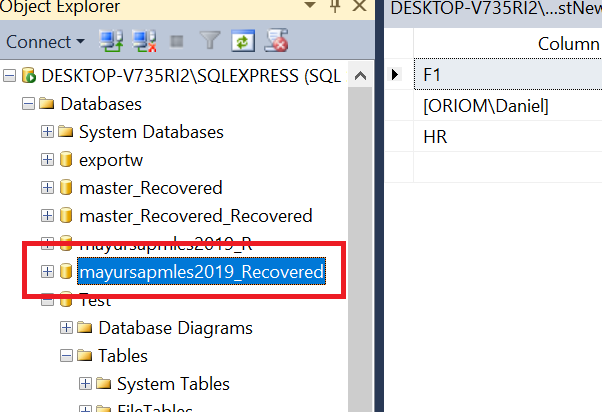
4: Finally Restore Process Completed
The expert’s advice is to use SQL Data Recovery Software. There are many corruption errors, which are complex to solve by any manual methods. This professional solution can fix all the SQL Server database-related issues.
Tool Steps to Perform SQL Server Object Level Recovery:
1. Open the Software and Browse MDF and NDF Files

2. Scan Corrupted SQL Database Files by Quick Scan and Advance Scan

3. Get a Preview Delete SQL Database Objects and Records

4. Restore Recovered SQL Databases into SQL Server Database, SQL Scripts, and CSV

We assure you that since this tool works on your local computer, minimising the risk of data compromise over the network.
Additional Benefits of the Tool
This tool is an advanced solution that you can use to restore the database MDF and NDF files. It assures you that you can recover any data that has been corrupt or after delete. With the help of this solution, the process of SQL Server object level recovery becomes much easier and convenient for the users.
The software can help you check the database before restoring it. In this way, you can selectively restore the data. You also get the option to restore deleted tables and other objects. Objects such as triggers, views, indexes, sequences, forms, and reports.
In addition, you can also export the database directly to another healthy system database, an SQL script file, or a CSV file.
Author’s View
Although we can carry out the SQL Server object level recovery process ourselves, there are still limitations, such as the need for a backup file beforehand. In addition, you can restore the data before making the backup. So far, you cannot restore the data. In addition, you cannot restore all items. With the smart solution, you can be sure that you will receive every bit of data that was corrupt before the last save.