
Corrupt DOCX File Repair
DOCX Repair Software
DOCX Repair fixes corrupt DOCX documents and brings your text, tables and images back. Add your files, preview the result and save a clean copy.
- Corrupt DOCX documents
- Rich Text and Plain Text preview
- Macro and Final files
- Windows desktop edition

- Free DemoTest before you buy
- 30 Day RefundDemo test comes first
- Card or PayPalHosted store checkout
- Fast License KeySent by email
- 24x7 SupportChat and email
1Is this my case?
Which Cases Need DOCX Repair?
Find your case below. RecoveryTools software repairs the DOCX file and keeps your formatting.
- Word Cannot Open the FileWord says the document is unreadable or cannot open.
- Shutdown Hit Mid EditYour computer shut down while the file stayed open.
- Virus Damaged the FileMalware corrupted your document.
- File Will Not OpenWord keeps failing on a multi page document.
- Many Files Are BrokenYour folder of documents needs a batch fix.
- Formatting MattersYour team needs fonts, tables and layout back.
DOCX Documents
Repair documents from every supported Word version.
Rich Text Preview
Check fonts and layout before you save.
Batch Mode
Repair a folder of documents at once.
DOCX Repair fixes files without Office on the computer. Preview works best with Microsoft Word 2007 or later.
Free demo mode repairs and previews the document and does not save it.
2What changes?
What Changes After the Recovery?
Before
- DOCX file that Word will not open
- Pages of work stuck behind an error
- Tables and images lost to damage
After
- Text and layout in a preview
- Files load by folder in one pass
- Clean DOCX copy saved with formatting
3What can it do?
Which Features Come With DOCX Repair?
Add the file, set your clues and recover the password from one window.
DOCX Documents
Repair multi page documents with text, images and tables.
Rich Text Preview
See fonts, tables, charts, SmartArt and links before you save.
Plain Text Preview
Check the text alone when the layout stays damaged.
File and Folder Mode
Load one document or a folder with many documents.
Search Drive Mode
Find DOCX files on a drive, including subfolders.
Macro and Final Files
Recover files with macros, restricted editing or Final marking.
Word 2007 to 2021
Repair files from older and newer Word versions.
Original File Untouched
Software saves a new copy and leaves your damaged file alone.
Preview Tools
Search and print inside the preview.
4Is it easy?
How to Use DOCX Repair in 4 Steps
Test the software in the free demo. Buy the license when you want the full result.
- 1Download
Install the Demo
Download the installer and install it on your Windows computer.
- 2Add
Add Your DOCX Files
Add one document, a folder or search a drive for damaged files.
- 3Preview
Preview the Repair
Check the repaired document in Rich Text or Plain Text mode.
- 4Save
Save the Clean Copy
Choose a location and save the repaired DOCX file.
Screenshots of every step sit in the DOCX Repair guide.
5What will I see?
Which Screens Does the Software Show?
Follow the path from the first screen to the finished result.

Select Your DOCX File
Choose File, Folder or Search Drive to load damaged documents.
Preview the Repaired File
Check the text and layout in Rich Text or Plain Text mode.
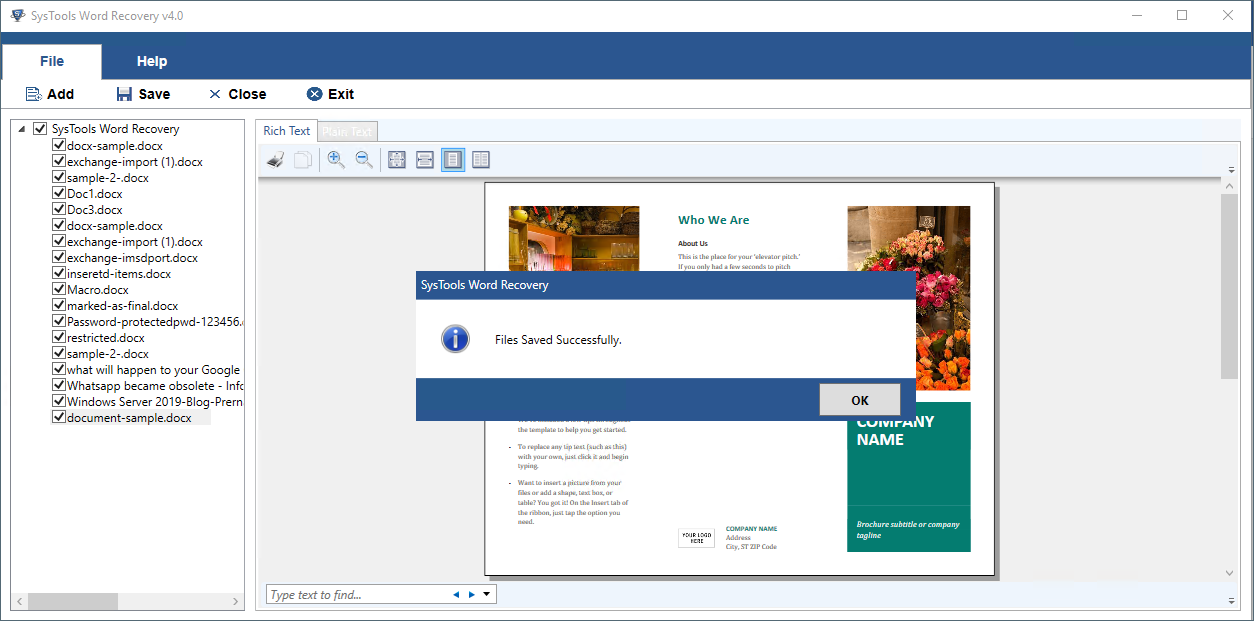
Save the Document
Click Save to store the repaired document.
6Demo or full?
Free Demo vs Full Version
See where the free demo stops and what a license adds.
| Feature | Free Demo | Full Version |
|---|---|---|
| Scan and repair | Yes | Yes |
| Add files and folders | Yes | Yes |
| Preview of repaired files | Yes | Yes |
| Save repaired files | No | Yes |
| Price | Free | From $45 |
7Will it fit my system?
System Requirements for DOCX Repair
| Product Version | 4.2 for Windows |
|---|---|
| Download Size | 11.1 MB |
| Product Type | Desktop software that repairs corrupt DOCX documents |
| Input Files | DOCX documents only |
| Word Versions | Word 2007, 2010, 2013, 2016, 2019 and 2021 |
| Windows | Windows 11 in 64 bit, Windows 10, 8.1, 8 and 7 in 32 and 64 bit, plus Windows Server 2008 and 2012 |
| Processor | Intel Pentium 1 GHz or better |
| RAM and Disk Space | 1 GB RAM recommended with 100 MB of free disk space |
| Pre Requisite | Microsoft .NET Framework 4.6.1 and Microsoft Word 2007 or later for the preview |
| Demo Limit | Repairs and previews files and does not save them |
8What is the price?
How Much Does DOCX Repair Cost?
Choose the license by the number of computers. Prices are in US dollars.
1 Computer
$45
- Home and private use
- 1 year of free updates
- Unlimited 24x7 support
Up to 100 Computers
$99
- One location in one country
- 1 year of free updates
- Unlimited 24x7 support
Up to 500 Computers
$299
- Offices in many places
- 1 year of free updates
- Unlimited 24x7 support
Need more Office repair tools? Office File Recovery Suite adds Excel Recovery, Access Recovery and PowerPoint Recovery for $99 instead of $212.
See more savings on the RecoveryTools offers page.
9Is it safe?
Can You Trust the Software With Your DOCX Files?
See Results First
Test the free demo on a damaged DOCX file and check the preview before you pay.
In Business Since 2007
RecoveryTools stands on a company that began in 2007 and now helps users in over 100 countries. Find more about RecoveryTools.
ISO Certified
Standards ISO 9001:2015 for quality and ISO/IEC 27001:2013 for information security back the company. See the awards and certifications page.
Terms in Plain Sight
Refund, privacy and usage terms are public before you pay. See the refund policy, privacy policy and terms of use.
10Need a hand?
Where to Get Help With Your DOCX Repair
Support engineers answer questions before and after you buy. Visit the RecoveryTools support center for phone numbers and more ways to get help.
Live Chat
Talk to an expert on live chat at any hour.
Email Support
Email support@systoolsgroup.com with your DOCX file details and the error message.
Remote Session
An expert connects to your computer and solves a hard case for you.
Step by Step Guide
Follow the user guide for the add, preview and save screens.
11Still have a question?
Questions About Repairing DOCX Files
Can the software repair a corrupt DOCX file?
Yes. Add the damaged DOCX file, preview the repaired content and save it.
Which Word files does the software open?
DOCX files from Word 2007 up to Word 2021 work, including files with macros, Final marking and restricted editing.
Does it repair DOC files?
No. Here the focus is DOCX only. For DOC and DOCX together, use Word Repair.
Which errors does the software fix?
Unreadable documents, files that will not open and corruption after a shutdown or virus all fit.
Can I repair many files at once?
Yes. Add files, add a folder or search your drives and repair them in one session.
What is the difference between Rich Text and Plain Text preview?
Rich Text keeps fonts, tables, charts, comments and links. Plain Text shows the text only.
Does the software keep my formatting?
Yes. Fonts, layout, images, tables and hyperlinks stay in the repaired file.
Do I need Microsoft Word installed?
No for repair. Yes for an accurate preview, because preview needs Microsoft Word 2007 or later.
Does it recover deleted files?
No. Software repairs corrupt DOCX files and does not bring back deleted ones. Use Hard Drive Recovery for deleted files.
What does the free demo do?
Free demo mode repairs the file and shows a preview. Saving the recovered file needs the full version.
Is there a Mac edition?
No. Software works on Windows only.
What is the system requirement for the software?
Plan for 100 MB of free disk space and 1 GB RAM.
How much does the software cost?
Personal costs $45 for 1 computer. Business costs $99 for up to 100 computers. Enterprise costs $299 for up to 500 computers.
Can I get a refund?
Yes. Refund requests are accepted for 30 days under the RecoveryTools refund policy. Software bought without a demo evaluation does not qualify. Email a signed Letter of Destruction to sales@recovery-tools.org. Bundle purchases cannot be refunded.
12Where next?
Related RecoveryTools Software
Repair Your DOCX File With the Free Demo
Download the free demo, preview your repaired file and buy the license when you want to save it.